One rule: halve it every half-life
Each drink counts in full from the time you finish it. From then on, the amount still counted halves once every half-life. Your estimate at any moment is the sum over all the drinks you have logged:
caffeine left = amount × 0.5hours since the drink ÷ half-life
With the default half-life of 5 hours, the app's 95 mg drip coffee counts as about 48 mg five hours later, about 24 mg after ten hours and about 12 mg after fifteen.
The 5-hour default is close to the mean half-life of about 5 hours reported for healthy individuals. The same review gives a range of 1.5 to 9.5 hours between people (Institute of Medicine, 2001). StatPearls also puts the average adult at about 5 hours. That spread is why the half-life is a setting you can change.
The settings behind every number
During setup, Unbuzz asks for your bedtime. The other settings begin at these values, and all of them can be changed in Settings:
| Setting | Starts at | You can choose |
|---|---|---|
| Bedtime | 11:00 PM | Any time |
| Wake time | 7:00 AM | Any time |
| Bedtime level | 25 mg | 10, 15, 25, 35 or 50 mg |
| Caffeine half-life | 5 hours (Normal) | Fast (3.5 hours), Normal (5 hours) or Slow (7 hours), or any value from 2.5 to 11 hours in steps of 0.1 hour |
Bedtime is the moment the estimate is checked against. Between bedtime and wake time, the app treats bedtime as now: a check at 11:20 PM looks at the amount right then, not at tomorrow night.
Bedtime level is, in the app's words, the amount you want to be under when you go to bed. It starts at 25 mg. It is a target you set, not a medical threshold or a prediction of how you will sleep.
Half-life decides how fast the curve falls. The presets are shortcuts; the slider sets any value in between.
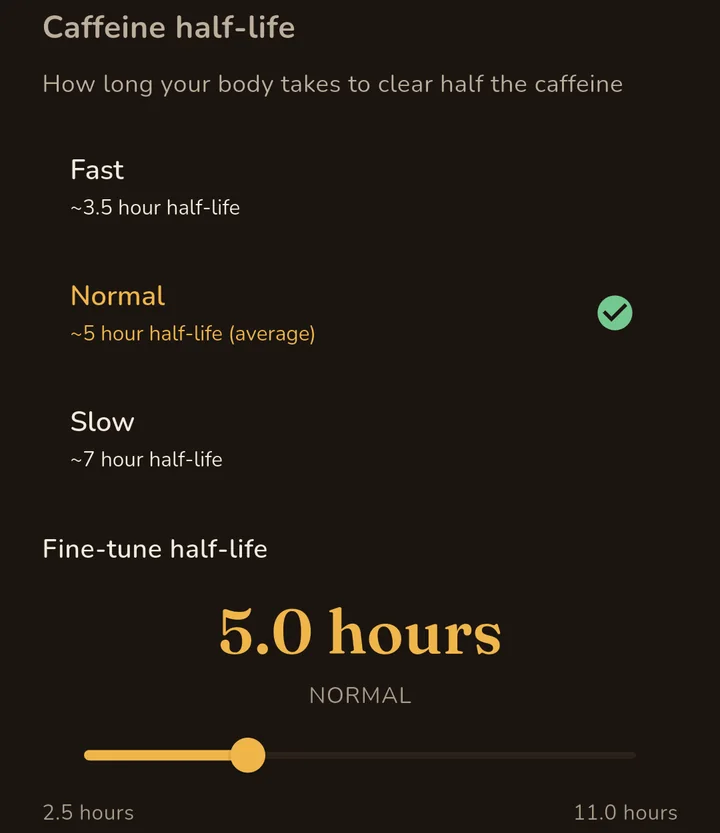
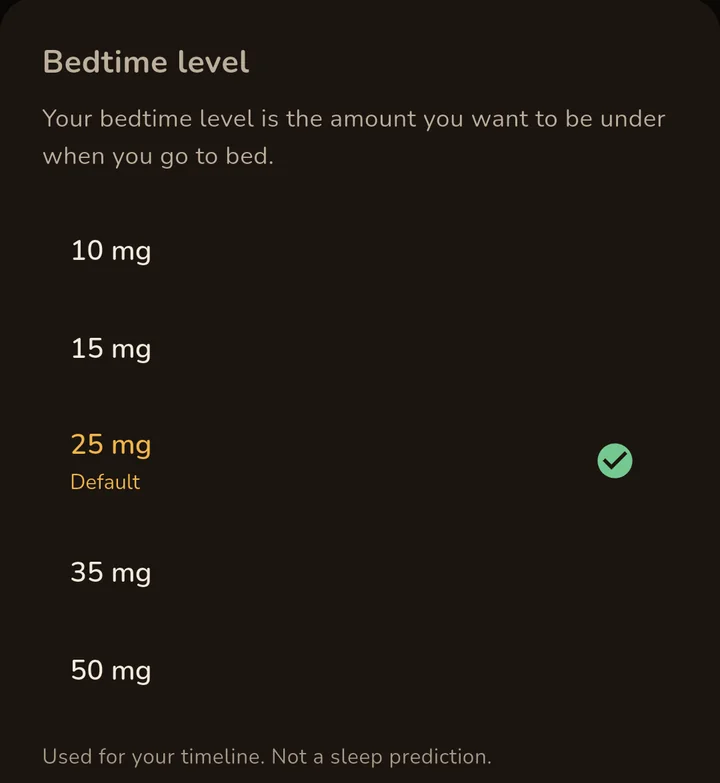
Settings in Unbuzz 1.10.0 on Android. The iPhone app has the same choices.
Estimates are not stored. The app works them out again from your logged drinks every time, so a new half-life or bedtime level applies at once, including to past days in History.
What "Can I have another?" calculates
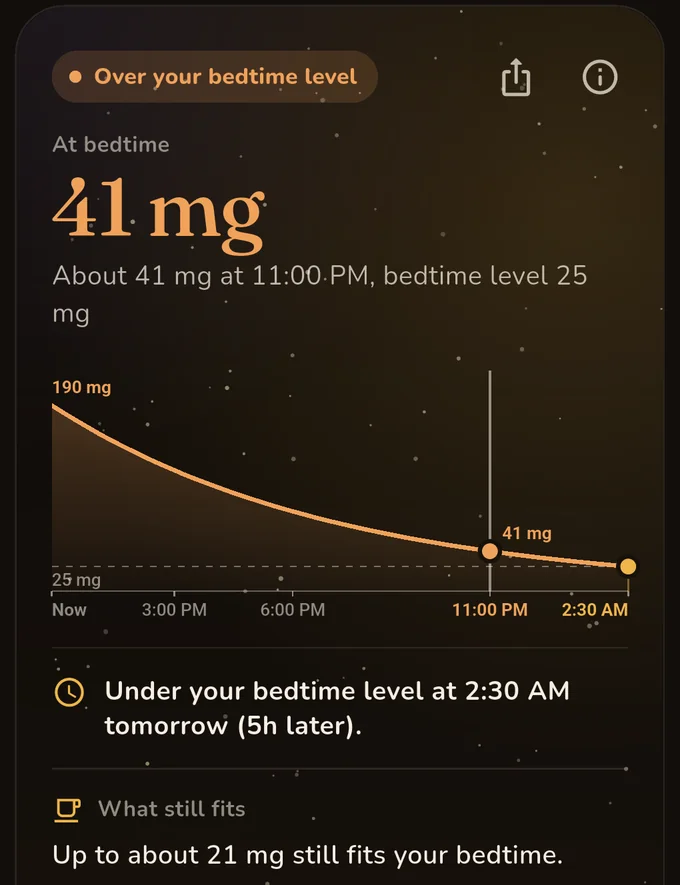
- It adds the drink you're considering, at the time you will finish it, to what you have logged, and estimates the amount left at bedtime. Nothing is saved until you tap Log it.
- It compares that amount with your bedtime level:
- Fits your bedtime: at or under the level.
- Close to your bedtime level: over it by no more than 10 mg or 40% of the level, whichever is more. With 25 mg, that is up to 35 mg.
- Over your bedtime level: more than that.
- It shows when the estimate falls under your bedtime level, and how much later that is than without the drink.
- If the drink doesn't fit, What still fits gives the largest amount that would: the room left under your bedtime level, divided by the share of each milligram still counted at bedtime.
- Compare reruns the check for an hour earlier, half or one serving, or decaf (3 mg in the app), without logging anything.
The example in the screenshot
Bedtime is 11:00 PM, the half-life 5 hours and the bedtime level 25 mg. A 95 mg drip coffee logged at 11:52 AM leaves about 20 mg at bedtime on its own. A second one a minute later adds about 20 mg more, so the answer reads about 41 mg: more than 10 mg over the level, so Over your bedtime level. The estimate gets under 25 mg at 2:30 AM, five hours later than without the second coffee. About 4.7 mg of room is left, and each milligram drunk now still counts as about 0.214 mg at bedtime: 4.7 ÷ 0.214 is about 21.9, which the app rounds down to 21 mg that still fits.
The same coffee with three half-lives
A 95 mg coffee finished at 3:00 PM, nothing else logged, bedtime 11:00 PM and a 25 mg bedtime level:
| Half-life | Left at 11:00 PM | Answer |
|---|---|---|
| Fast, 3.5 hours | About 19 mg | Fits your bedtime |
| Normal, 5 hours | About 31 mg | Close to your bedtime level |
| Slow, 7 hours | About 43 mg | Over your bedtime level |
Timing
Under Set the timing you choose when you will finish the drink and how long you take: finished at once, or over 15, 30 or 45 minutes or an hour. A drink taken over time is counted in equal parts, one every 15 minutes, ending at the finish time. Logging it saves the same parts, so the curve after logging matches the check.
Your last call
The free "Can I have another?" widget and the optional last-call reminder use a last call: the latest time one more of your usual drink would still leave you at or under your bedtime level. Your usual drink is the one you have logged most in the last 30 days, at its average amount; with nothing logged, it is the app's 95 mg drip coffee. The time is rounded down to 5 minutes, and the widget also counts the caffeine you have already logged.
With nothing logged and the default settings, 95 mg takes about 9 hours 38 minutes to fall to 25 mg. 11:00 PM minus that is 1:22 PM, so the last call reads 1:20 PM.
The reminder comes 30 minutes before the last call. Without Pro it uses your usual drink and bedtime only; with Pro it updates with what you log, counting your drinks from the last 48 hours.
What the estimate leaves out
- It is not a measurement. Unbuzz never measures caffeine in your body. It only knows the drinks, amounts and times you log.
- Absorption is skipped. The app counts each drink in full from the moment you finish it. Your body takes time: one review reports 99 percent absorbed within 45 minutes, with peak blood levels 15 to 120 minutes after drinking (Institute of Medicine, 2001). So right after a drink, the curve counts caffeine you haven't absorbed yet.
- One half-life for everything. The same half-life applies to every drink, every hour and every amount. It doesn't change with the time of day or with what else you had.
- Amounts come from labels and presets. Branded drinks use their catalogue value and common drinks use the app's presets. A home brew or a café serving can differ, so edit the milligrams when you know better.
- The bedtime level is your choice, not a sleep prediction. Unbuzz doesn't predict when you'll fall asleep or how you'll sleep.
- It is not medical advice. Unbuzz is an informational tool for planning your drinks.
Try the arithmetic
The check on the homepage runs this model with the app's default half-life and bedtime level. The caffeine timeline uses the same half-life rule and lets you add several drinks in your browser. The app's how-to videos show its main screens.
Sources
- Institute of Medicine (US) Committee on Military Nutrition Research. Pharmacology of Caffeine. In: Caffeine for the Sustainment of Mental Task Performance. National Academies Press, 2001. NCBI Bookshelf NBK223808. Mean half-life, range between people, absorption and peak times.
- Evans J, Richards JR, Battisti AS. Caffeine. StatPearls, updated May 29, 2024. NCBI Bookshelf NBK519490. Half-life in the average adult.
- Every other number on this page is a default, an option or a result of the Unbuzz 1.10.0 app.

