
The same app as on iPhone
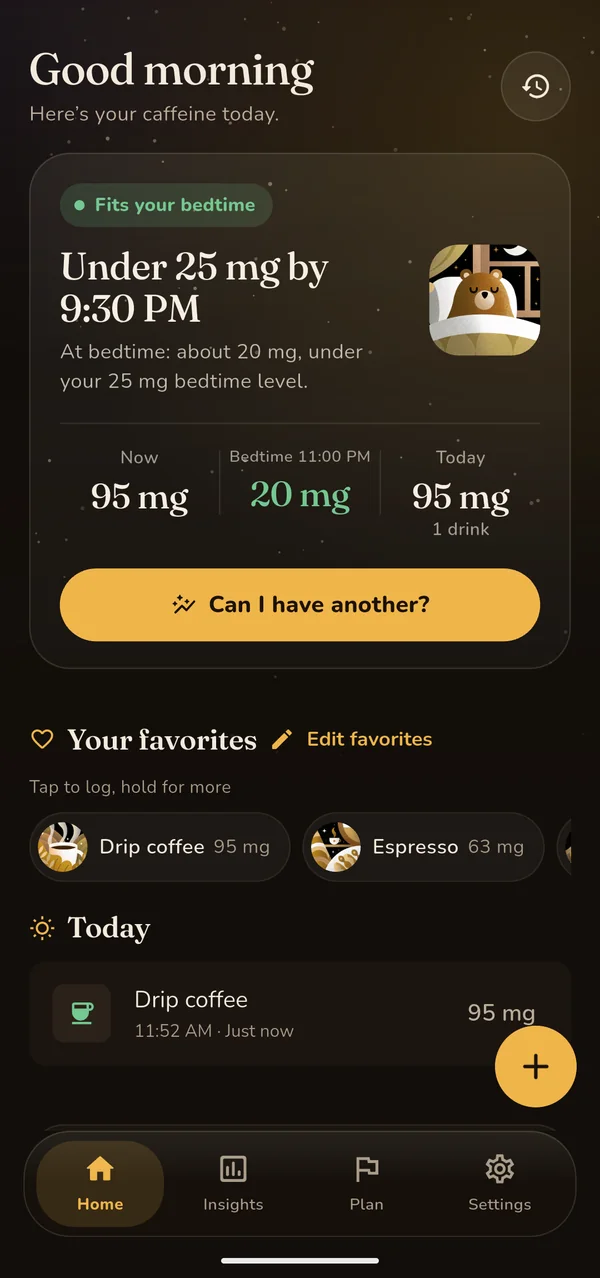
The estimate, the drink catalogue and the "Can I have another?" check work the same on Android as on iPhone (how the estimate works). On an Android phone you can:
- log drinks from the branded catalogue, scan a barcode with the phone's camera, or add a custom drink with your own milligrams;
- check a drink before you have it, and compare an hour earlier, half a serving or decaf without logging anything;
- follow your estimated caffeine through the day, with your bedtime and bedtime level marked;
- get optional reminders, which arrive as Android notifications;
- use the app in 12 languages, with no account.
Ten short narrated how-to videos cover the Android app. They are recorded on iPhone; the steps are the same on Android, except for widgets, and the Android app plays them in Settings too.
Screenshot: Unbuzz 1.10.0 on a Pixel 7 emulator with Android 16, after logging one drip coffee.
The free "Can I have another?" widget
The widget answers one question on your home screen: would one more of your usual drink still fit under your bedtime level tonight?
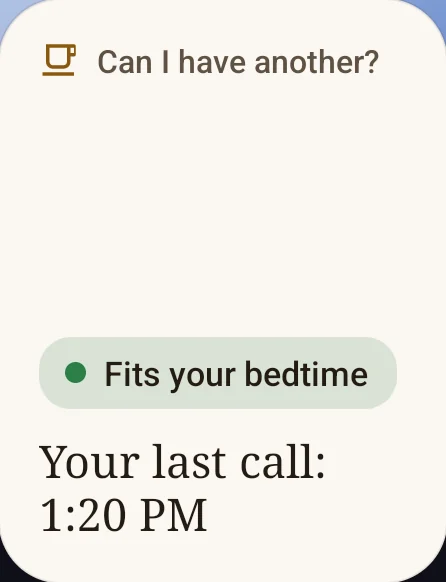
- Fits your bedtime, with Your last call: one more of your usual drink fits if you have it before that time.
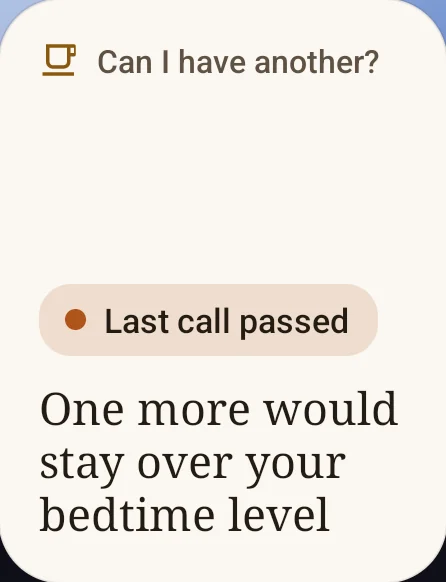
- Last call passed: one more would keep you over your bedtime level tonight.
- Tap to check: the widget has no current answer, which happens if you haven't opened Unbuzz for a day or two (once a bedtime has passed since you last opened it).
Your usual drink is the one you logged most in the last 30 days, at its average amount; before you have logged anything, Unbuzz uses its 95 mg drip coffee. What you have already logged counts, so the last call moves earlier as you drink more. The widget switches to "Last call passed" by itself when the time comes, without opening the app. Tapping it opens "Can I have another?" in Unbuzz. How the last call is worked out.
Add it to your home screen
- Touch and hold an empty spot on your home screen.
- Tap Widgets.
- Find Unbuzz in the list.
- Touch and hold a widget, then drag it into place. The free one is "Can I have another?".
Screenshots: Unbuzz 1.10.0 on the Pixel launcher (Android 16), bedtime 11:00 PM, bedtime level 25 mg, usual drink a 95 mg drip coffee. The steps are the ones the app's widget screen gives.
Free and Pro on Android
| Free | Pro |
|---|---|
| Logging, drink search, barcode scan, custom drinks and favorites | Full history, trends and deep insights (free shows the last 14 days) |
| "Can I have another?" check and its widget | An estimate widget with two quick-log buttons |
| Estimated curve, bedtime level and last call | A countdown notification on the lock screen |
| Reminders: under your bedtime level, your last call, a planned drink | A last-call reminder that updates with what you log |
| How‑to videos | A plan to cut back gradually, export, and more than one profile |
The Pro widget shows your estimated caffeine now and the time it drops under your bedtime level, and its two buttons log one of your usual drinks in Unbuzz with one tap. The countdown is an ongoing notification that counts down to the time you're estimated under your bedtime level. It appears only while you're over that level and ends by itself.
Pro is a subscription or a one-time purchase through Google Play. On the US Google Play listing, in-app purchases are listed at $1.49 to $14.99 per item (checked November 4, 2026). If you change phones, Restore purchases in Settings checks your Google Play account for Pro.
What's different from iPhone
| Feature | iPhone | Android |
|---|---|---|
| Watch | Apple Watch app and complications, free; logging from the watch with Pro | No watch app. Apple Watch is set up with an iPhone, and Unbuzz has no Wear OS app |
| Health data | Apple Health, optional | Not connected; Unbuzz has no Health Connect support |
| Home screen | "Can I have another?" widget, free; estimate and quick-log widgets with Pro | "Can I have another?" widget, free; estimate widget with quick log, with Pro |
| Lock screen | Lock Screen widgets; the Pro countdown is a Live Activity | The Pro countdown is an ongoing notification |
| Voice | Siri and Shortcuts actions; logging by voice with Pro | None |
| How‑to videos | All 11 | All except the widgets video, which shows iPhone steps |
From the Unbuzz 1.10.0 app. Apple Watch setup needs an iPhone, per Apple's setup guide.
Other caffeine trackers on Android
We make Unbuzz. HiCoffee, a well-known caffeine tracker for iPhone and Apple Watch, has no Android version that we could find: its developer's website links only to the App Store, and a Google Play search for HiCoffee on November 4, 2026 showed no HiCoffee listing.
Two other caffeine trackers on Google Play are Caffeine Clock, which is also on iPhone, and CaffeInMe, which tracks caffeine and water together and contains ads. We compare them with HiCoffee and others on HiCoffee alternatives.